

Aki Dev Sync
macOS · Tauri v2 v1.34.0Sync a split development environment, code on both sides, no junk commits just to move files.
github.com/lacvietanh/aki-dev-sync · Dev tool
Local ↔ remote development control
Aki Dev Sync is a macOS app built with Rust Core and Tauri v2 born to seamlessly orchestrate split development environments. By exploiting the raw power of OS-integrated rsync and ssh, the application sharply bifurcates your workflow: LOCAL serves as the "main source", where you keep your Git history, conduct rigorous reviews, and fine-tune code using the Antigravity IDE; meanwhile, REMOTE acts as the "Heavy Industry Workshop," a powerhouse server engineered to endure large compilation builds, cloak core API keys, or serve as a dedicated grinding ground for AI agents (like Claude Code / Claude MAX). The PUSH process fires context up to the remote while the PULL mechanism harvests the generated code back down in a predictable operational loop without requiring commits just to move files. It also reads Claude Code quota from the statusLine cache and Antigravity quota from local RPC.
The real interface
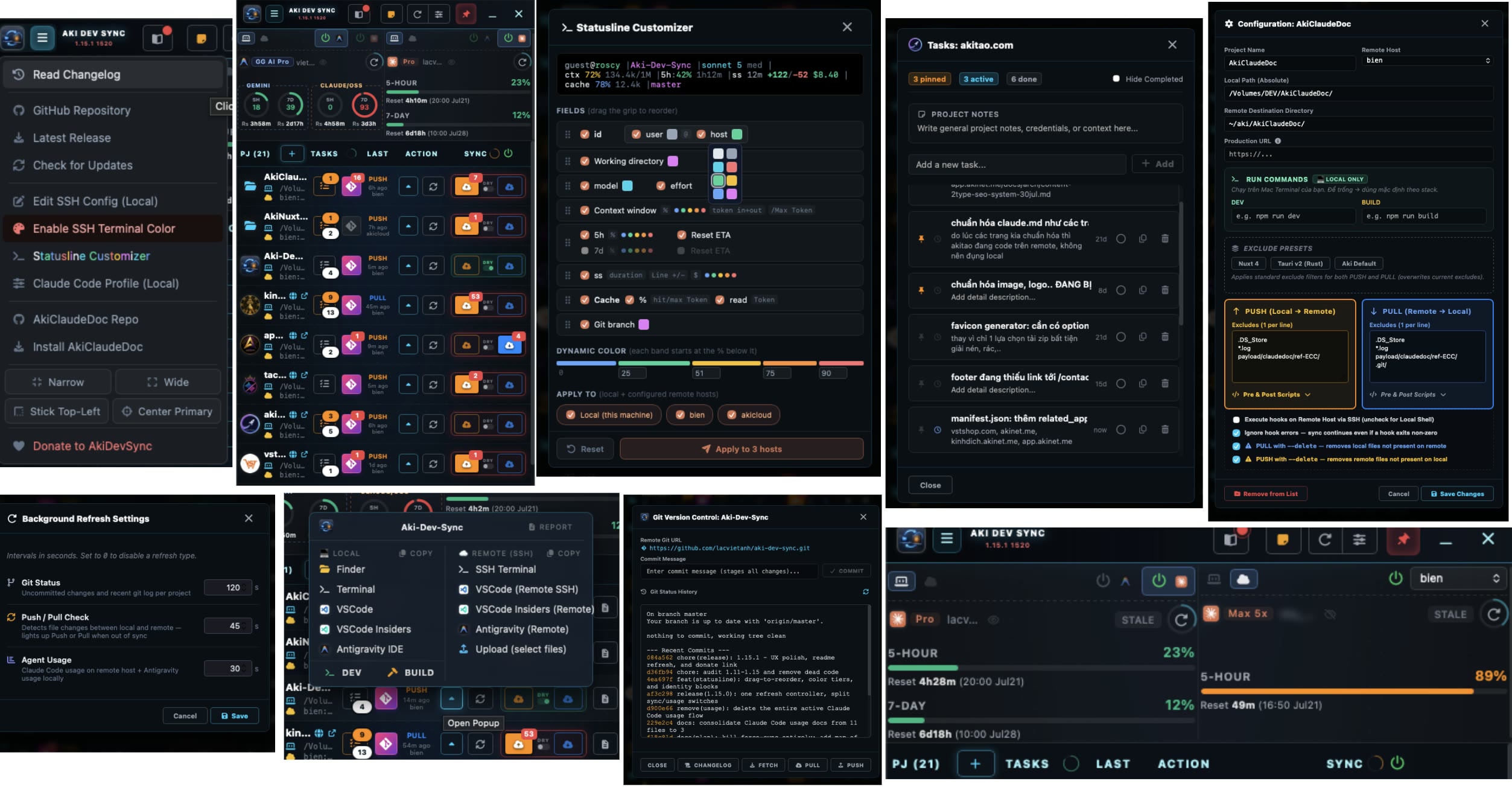
The Local ↔ Remote model
LOCAL, source of truth
Holds the Git history. You review, commit and edit in a personal IDE.
REMOTE, AI workspace
A stronger box over SSH where an AI like Claude Code reads the full context and generates code at scale.
PUSH sends local changes up so the AI sees everything. PULL brings the AI's work back to review and commit, closing the loop without junk commits just to move files.
Features
PUSH/PULL (rsync) & Push-only Paths Mechanism
Baseline-aware two-way sync: Push local source code to a remote server for AI agents to grind on, then reap the fully generated code back for you to audit and commit. The app provides a powerful DRY RUN dashboard predicting every byte change with a detailed preview. The killer feature is turning the .git/ directory into a push-only path: pushing history up fuels the AI's context, but blocking it from pulling down banishes the mtime trap (hidden index updates) that causes phantom Sync badge alerts.
Conflict Protection (baseline snapshot, Conflict Table, Hooks)
Wields a manual Select File module featuring a deep-analysis Conflict Table: comparing millisecond-level modification times (mtime) between local and remote before overwriting, thwarting the disaster of accidentally wiping the AI's hard work. The Mirror-delete (--delete) mode is custom-tailored per project with triple-layer safety warnings. Furthermore, you can script Pre/Post hook shell files to automatically build docker containers or fire Slack webhooks sandwiched around every rsync lifecycle.
REAL Quota Monitoring System (Agent Usage)
Reads supported quota sources instead of estimating tokens. For Claude Code, it reads rate_limits from the CLI statusLine cache locally or through SSH; several Claude Code accounts on one machine each keep their own quota, click the email on the card to switch and pin an account per slot. For Antigravity, it reads quota through the agy CLI or the IDE Language Server. The two quota sources are managed independently.
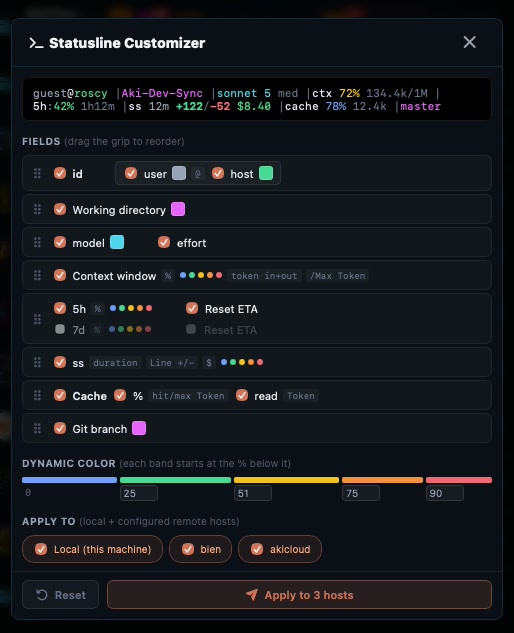
Statusline Customizer (Bash UI Builder)
A miniature terminal UI manufacturing plant. You can construct the Claude Code CLI status bar configuration via a purely visual HTML5 environment: toggling variables (tokens, budget), using your mouse to drag and drop blocks, and manipulating a dynamic 5-tier color ladder warning of account depletion. The entire design is rendered in Live Preview, then automatically injected straight into your local machine or configured remote SSH hosts simultaneously without hand-editing files.
Smart Open Popup & Lockfile Analyzer
A sophisticated navigation command menu replacing dozens of manual steps. Automatically forks into clear lanes: Local access (Finder, Terminal, binary scanning for VSCode/Insiders/Antigravity) and Remote access via SSH tunnels (SSH Terminal, triggering VSCode/AG Remote modes). Notably, the system embeds an engine that analyzes package configuration files (package.json, Nuxt, Tauri) to auto-generate 1-click DEV and BUILD buttons, opening an in-app terminal tab.
Spatial Desktop Management & Permanent Pinning
For multi-project workflows, pin the Tauri window using the current macOS work area. Narrow, Wide, Stick Top-Left, and Center Primary presets keep the window layout consistent when switching between projects.
Built-in toolkit
Task lists use CSS Zero-JS Textarea fields that grow with their content. Global Note saves automatically. Git Panel shows ANSI colors and Mermaid changelog previews. SSH Config Editor backs up the file before saving.
Who is it for?
- Coding on a light machine while running builds and AI on a stronger server.
- Needing to keep the core source code on your own remote server.
- Switching fast between several machines without junk commits on GitHub.
- Wanting to feed a full project, including .git/, so an AI agent gets complete context.
Multiple projects, multiple macOS Desktops
A common way to organize work on macOS is to dedicate each Desktop (Space) to one project. The problem: every swipe to a different Desktop loses visibility into the others. Pinning the Aki Dev Sync window (a real, shipped feature since v1.11.0) keeps it visible and on top across every Space, combined with the Stick Top-Left or Narrow size presets for a persistent dashboard in a screen corner, regardless of which Desktop you are on.
Under the hood
ANSI Terminal & Regex Code Parsing
A client-side regex parser tasked with capturing and fragmenting raw terminal escape color codes (like \x1b[32m), subsequently compiling them into styled HTML nodes. This ensures the Git panel displays commit logs in vivid, native terminal colors. Furthermore, it uses the core.quotepath=false git configuration to properly render Vietnamese Unicode characters, eliminating garbled encoding artifacts on the UI.
Smart Stack Analyzer & Binary Detect
The launch utility goes far beyond simple shortcuts. It houses an analyzer engine that recursively scans project scaffolding and deeply interrogates package lockfiles (pnpm-lock, yarn.lock, bun.lockb, npm). From this, it dynamically deduces and constructs the precise DEV/BUILD invocation commands (e.g., npm run tauri dev) to spawn inside the macOS terminal. Coupled with an OS-level binary detection mechanism, it selectively dims missing IDE installations (like VSCode Insiders).
Zero-JS Auto-growing CSS Architecture
Putting a definitive end to relying on third-party libraries or computationally heavy Javascript resize event listeners that cause frame drops. The app pioneers the use of modern WebKit engine CSS properties: field-sizing: content. This feature allows all task note Textareas and notepads to natively auto-grow in height, matching your typing payload pixel-for-pixel with smoothly.
Hybrid Quota Patching & CLI Deep Read
Eschews estimated tokens. Reads official rate_limits (5h/7d caps) by hooking directly into the statusLine cache file generated by the Anthropic CLI. Confronting the notorious HTTP 429 trap when users overspend, the system injects a Hybrid Patching sequence using bash script piped through jq to salvage the data frame, keeping the UI resiliently alive even when you face a quota exhaustion blackout.
JSON-RPC Antigravity Engine Port Scan
Exquisite IDE quota reverse-engineering tech: Instead of calling external APIs, it unleashes an OS-level lsof Process Table scan to hunt down the localized TCP port inhabited by the IDE's Language Server. Instantly, it fires a direct HTTP/JSON-RPC Connect protocol payload, compelling the server to dump its Gemini and Claude OSS token pools locally: local RPC responses without an intermediary quota service.
Unit-of-Work Monolithic Controller
Constructs a singular Monolithic UI data flow update Controller. Every single initialization trigger (from background timers and user clicks to config save streams) converges on one main core function. The system issues "generation tokens" to route flows, reducing overlapping refresh requests and keeping the busy state tied to the active refresh.
Eradicating the Git mtime Trap
Git updates the index file inside the .git/ directory, manipulating mtime and tricking rsync into believing there are new files to sync, causing the PUSH button to constantly flash annoyingly. Aki Dev Sync's Dry-run Filter uses high-speed string scanning to scrape out directory-only entries, forcing the system to trigger alerts exclusively when real source code files have been modified.
Baseline snapshot disambiguation
The reality is Rsync is stateless (blind): when file X exists on machine A but is absent on machine B, Rsync doesn't know if A created X or B deleted X. This fatal flaw is patched via the baseline snapshot Disambiguation architecture. After every successful sync cycle, the app writes a baseline snapshot to a local JSON file. During the next run, it cross-references this snapshot to instantly distinguish whether file X was deleted locally (accepted) or newly created remotely (ignored), using the snapshot to compare state.
New in v1.34.0 (2026-10-21)
1.34.0 keeps each Claude Code account's quota apart: the usage card no longer jumps to whichever account ran last, click the email to switch accounts and pin one per slot. An older statusline hook is upgraded on its own at launch, on this Mac and on every SSH host, keeping your Customizer settings with a backup. A hidden or minimized window no longer slows the app down, so the phone companion keeps answering, and its project list is back (it was empty since 1.31.0). npm run tauri dev now runs beside the installed app with its own data folder.
1.33.x (Oct 7 and Oct 19): the DMG ships Install Aki Dev Sync.command, which signs the app with one stable certificate, so updates no longer make macOS ask for folder permissions again. PUSH/PULL counts leave out files that only differ by modified time (listed separately in the tooltip and the Sync Changes popup). Dropping a file or link onto the window no longer blanks the app; F1-F3 and F12 work while the terminal runs a full-screen program; the git remote link opens for SSH remotes. Antigravity quota reads through the agy CLI again.
Installation
- Download the latest .dmg from the GitHub Releases page (arm build for Apple Silicon, universal for both Intel and Apple Silicon).
- Open the .dmg and double-click Install Aki Dev Sync.command. Do not drag the app into Applications by hand: a dragged copy is unsigned and macOS will refuse to open it.
- The installer creates a self-signed certificate in your keychain (first time only), signs the app, copies it to Applications and opens it. If macOS blocks the .command file, follow READ ME.txt inside the .dmg.
Requirements: rsync and ssh available on your PATH (both preinstalled on macOS), plus a reachable SSH host.
Tech stack
Source is public on GitHub. The repo ships no LICENSE file yet, so it is source-available, open to read and build, without a formal source-available license. The app is free to download and use.
Author
Lạc Việt Anh , the founder of the Aki ecosystem. Aki Dev Sync was born from his own daily workflow: code on local, let the AI run on a remote server.
AkiTao Ecosystem Context
Aki Dev Sync is a dev tool in the AkiTao.com ecosystem. Together with AkiDevRule (the Claude Code + Antigravity rule/skill baseline) and AkiDEV (engineering knowledge), it reflects how AkiTao works with AI day to day. Full write-ups about this app are published on app.akinet.me, the mini-app platform of the same ecosystem.
Part of the Aki ecosystem, 5,500+ users, one shared account.
Frequently Asked Questions
What is Aki Dev Sync?
How does the Local ↔ Remote model work?
How do I install it and what are the requirements?
How does Aki Dev Sync measure AI quota so accurately?
What incredible power does the Statusline Customizer bring?
Is Aki Dev Sync source public?
Sync a split development environment, code on both sides in one click.
Download Aki Dev Sync